Explore the Shared Pilot Project Brief, Business Analyst Pilot, Developer / QA Pilot and six specialist curricula below. Each path has prerequisites, four deliverable gates and an assessment rubric. Curriculum availability is not enrollment availability; contact SAHAYA to confirm intake and enrollment requirements.
Student Project Portal
Read the English video transcript
[Welcome]
Give students a real project, not just a textbook problem. Welcome to SAHAYA. In this briefing, we look at student project portal.
[Audience and format]
This briefing is written for school district leaders and college program directors. Like every SAHAYA briefing, it follows four steps: Situation, Task, Action and Result. It is a sample scenario, not a client result or a guarantee.
[Situation]
Situation. Students want experience before graduation, but real projects are hard to find. Teachers struggle to organize them, and employers want evidence of practical skill.
[Task]
Task. Provide a portal where students find guided projects, understand the goals, and begin real work with support.
[Action]
Action. Here is how SAHAYA approaches it. First, we define the project catalog, with goals, skills practiced, effort and expected deliverables. Second, we set up the portal so students can browse, apply, join teams and see their responsibilities. Third, we pair projects with mentors and clear expectations, using approved or synthetic data for safety. Finally, we collect results and feedback, and improve the catalog each term.
[Reference architecture]
Reference architecture. A sample reference architecture for student project portal has four layers. Layer one, catalog, covering guided projects with clear goals. Layer two, enrollment, covering students, teams and roles. Layer three, guidance, covering mentors, checkpoints and resources. Layer four, outcomes, covering deliverables and feedback.
[Result and sample ROI]
Result. In this illustrative example, a student joins a team, completes a milestone, and adds the result to a portfolio. Authenticated education workspaces are available by agreed scope. For quick reference, here is a sample of the benefits to discuss. Benefit one, students gain documented project experience. Benefit two, teachers spend less time organizing and more time guiding. Benefit three, programs gain evidence of practical learning. These are directional examples to frame a conversation. Your results depend on your starting point and agreed scope.
[Industry alignment]
Industry alignment. Schools, colleges and universities can align projects to their own standards and course outcomes.
[Values and people in the loop]
Our value of Growth means students learn by doing real work with real support. In everything we do, people stay in the loop: your team reviews the evidence, and accountable humans make the decisions.
[Next step]
If this looks like your situation, the next step is simple. Tell us what you are trying to improve, build, migrate or operate, and we will agree a focused starting point together. Visit sahaya.us, and choose Contact.
[Thank you]
Thank you for watching.
This video, including its script, voice-over, images, animation, music and design, is the property of SAHAYA LLC and/or its Affiliates and is protected by law. Any dissemination, distribution, copying, recording, reproduction or reuse, in whole or in part, without written permission is strictly prohibited.
The information shared is for general informational purposes and does not constitute a contract, offer or professional advice. Opinions expressed are those of SAHAYA LLC and may change without notice. All trademarks belong to their respective owners.
If you have received this video in error, please notify SAHAYA LLC and delete it.
(c) 2026 SAHAYA LLC. All rights reserved.
Use the student portal for your assigned workspace. Access is based on explicit account and record assignments; a customer profile alone does not grant project access.
Project expectations, submission arrangements, mentor feedback and next steps are agreed for each program. Customer profile and application features require enabled intake and separate access approval. The six areas on this page are scope options, not automatic inclusions.
Learning Workspace
Read the English video transcript
[Welcome]
A place where learning, practice and feedback come together. Welcome to SAHAYA. In this briefing, we look at learning workspace.
[Audience and format]
This briefing is written for school and college program leaders. Like every SAHAYA briefing, it follows four steps: Situation, Task, Action and Result. It is a sample scenario, not a client result or a guarantee.
[Situation]
Situation. Learning materials are spread across email, shared drives and chat. Students lose track of tasks, and mentors repeat the same guidance many times.
[Task]
Task. Provide a workspace that holds guides, tasks, examples and discussion for each project.
[Action]
Action. Here is how SAHAYA approaches it. First, we organize learning content by project and skill, from first steps to advanced practice. Second, we add tasks, checklists and examples so students always know what to do next. Third, we enable questions and feedback in context, so answers help the whole group. Finally, we review activity and refine materials based on where students struggle.
[Reference architecture]
Reference architecture. A sample reference architecture for learning workspace has four layers. Layer one, content, covering guides, examples and references. Layer two, practice, covering tasks, checklists and exercises. Layer three, conversation, covering questions and feedback. Layer four, improvement, covering activity insights and updates.
[Result and sample ROI]
Result. In this illustrative example, a student follows a clear path through a project and gets help without waiting for a meeting. For quick reference, here is a sample of the benefits to discuss. Benefit one, students find answers faster. Benefit two, mentors reuse guidance instead of repeating it. Benefit three, materials improve each term from real feedback. These are directional examples to frame a conversation. Your results depend on your starting point and agreed scope.
[Industry alignment]
Industry alignment. The workspace can support data, web, software and operations projects, matched to school or college needs.
[Values and people in the loop]
Our value of Clarity means every learner can see the next step. In everything we do, people stay in the loop: your team reviews the evidence, and accountable humans make the decisions.
[Next step]
If this looks like your situation, the next step is simple. Tell us what you are trying to improve, build, migrate or operate, and we will agree a focused starting point together. Visit sahaya.us, and choose Contact.
[Thank you]
Thank you for watching.
This video, including its script, voice-over, images, animation, music and design, is the property of SAHAYA LLC and/or its Affiliates and is protected by law. Any dissemination, distribution, copying, recording, reproduction or reuse, in whole or in part, without written permission is strictly prohibited.
The information shared is for general informational purposes and does not constitute a contract, offer or professional advice. Opinions expressed are those of SAHAYA LLC and may change without notice. All trademarks belong to their respective owners.
If you have received this video in error, please notify SAHAYA LLC and delete it.
(c) 2026 SAHAYA LLC. All rights reserved.
A browser-based workspace could guide students from a project brief to a working software result. Depending on the program design, it may include starter material, task checklists, milestone reviews, and links to approved development tools.
The tools, hosting model, account provisioning, code execution, collaboration model, and technical support need a separate design. No coding environment or isolated execution environment is provided by this marketing page.
Choose Your Project Path
Start with one role and one supported platform rather than trying to learn every cloud at once. These example projects use synthetic data and original work; final curriculum and support depend on the agreed program.
Business Analyst
Practice problem framing, process mapping, requirements, basic SQL and acceptance criteria. Build a stakeholder map, as-is/to-be process, user stories, traceability and a UAT plan for a sample student-support service. Review whether requirements are testable and linked to the business problem.
Discuss the Business Analyst path.
Developer
Start with Git, programming fundamentals, HTTP and SQL. Build a small application/API with migrations, automated tests, code review and a deployment runbook. Demonstrate a working feature and explain its security and maintenance decisions.
Tester / Quality Engineer
Learn requirements analysis, test design, API basics and automation foundations. Create a risk-based test plan, reproducible bug reports, API/UI checks and CI evidence for the sample application. Show both successful and negative-path tests.
Discuss the Tester / Quality Engineer path.
Application Support
Practice troubleshooting, log interpretation, clear communication and incident triage. Investigate a simulated outage, record a timeline, prepare an escalation and verify a recovery runbook. No client production systems are part of this exercise.
Discuss the Application Support path.
IT Platform / Cloud Administrator
Begin with networking, identity, operating systems and cloud fundamentals. Design an isolated infrastructure-as-code lab with scoped permissions, a budget, a restore exercise and teardown instructions. Lab accounts, access and cloud costs must be agreed first.
Discuss the IT Platform / Cloud Administrator path.
DevOps Engineer
Build on Git, scripting, Linux, networking and cloud basics. Create a reviewed CI/CD workflow with artifact provenance, secrets handling, environment separation, monitoring and rollback evidence. Demonstrate a controlled failure and recovery.
Discuss the DevOps Engineer path.
Data Engineer / Snowflake Developer
Start with SQL, data modeling, Python basics and data-quality checks. Use synthetic data to build an ingestion/transformation pipeline with tests, lineage, access boundaries and warehouse cost controls.
Discuss the Data Engineer / Snowflake Developer path.
Data Analyst / BI Developer
Practice business questions, SQL, statistics and visualization. Define KPIs, reconcile a synthetic dataset, build a reproducible dashboard and explain its assumptions and limitations to a reviewer.
Discuss the Data Analyst / BI Developer path.
Official Learning Resources
Use Microsoft Learn career paths, AWS training, Google Skills and Snowflake learning tracks for provider material. Provider accounts, eligibility, lab access, prices and credential requirements are set by those providers. These links do not establish SAHAYA partnership, authorized training status or included subscriptions. SAHAYA project review is separate from a provider exam or certification.
Pilot Project Brief
Shared project specification. The two pilots below share one original synthetic scenario: a learning-support request desk. Read the Business Analyst Pilot or the Developer / QA Pilot. These are project specifications, not a hosted application, an internship, academic credit or a provider certification. Confirm enrollment, start date, mentor assignment, fees and any lab access with SAHAYA before participating.
Shared Scenario And Scope
A fictional education team needs to receive learning-support requests, route them to the assigned mentor and explain their status to the learner. Today its imaginary spreadsheet mixes owners, loses revision history and makes duplicate requests difficult to identify. The project goal is to demonstrate a traceable request-to-resolution workflow, not to claim measured business savings.
Use only invented IDs and fictional request text. The minimum request fields are request ID, learner ID, assigned mentor ID, category, summary, status and version. Categories are learning-material and project-help; statuses are new, triaged and resolved. Keep dates in UTC when a change is recorded. Do not collect names, email addresses, postal addresses, attachments, payment information or real student records in this exercise.
Create six synthetic starting records: REQ-01 and REQ-02 belong to learner-a/mentor-a; REQ-03 and REQ-04 to learner-b/mentor-b; REQ-05 and REQ-06 to learner-c/mentor-a. The first request in each pair is new at version 1; the second is triaged at version 2. Use a short invented summary for each. Reset this same fixture before every repeatable acceptance run.
Shared Acceptance Contract
- R1: Ownership. A learner can create and read only their own requests. An assigned mentor can read and change status only for requests assigned to them. Test learner-a against REQ-03 and mentor-b against REQ-01: deny the operation without returning the other person's request data. Hiding a button is not authorization.
- R2: Valid input. Require an allowed category and a trimmed summary of 10 to 300 characters. The system assigns request ID, owner, initial status new and version 1; it must reject caller attempts to set another learner, a mentor, a resolved status or a version on creation. Route new requests through the exercise's fixed assignment map, never a caller-selected mentor.
- R3: State changes. Only the assigned mentor may move new to triaged, or triaged to resolved. Reject skipped, reversed and same-state transitions. A successful change increments the version once and records actor ID, UTC time, previous status and new status.
- R4: Concurrent edits. A status update supplies the last-read version. Reject a stale version without changing the saved record or history. Show the conflict, preserve unsaved input and require a reload/review before another save.
- R5: Truthful outcomes. Confirm success only after persistence. Simulate an unavailable store, show an actionable error, and retain input. After an uncertain save, reload before retrying; do not silently replay a write. Repeating the same create request key must return its original receipt, not create a duplicate.
- R6: Usable evidence. Label inputs, provide keyboard-operable actions and visible focus, announce errors/status, and check a 320px layout. Describe manual checks as well as automation; a passing scan is not proof of WCAG conformance.
For isolated exercises, use synthetic actors in a test harness to demonstrate access rules; this is not production identity verification. Do not expose a test identity switcher or seed credentials publicly. Real sign-in, customer-to-project entitlements and deployment need separately reviewed integration.
Common Review And Assessment Rules
Both pilots use four review gates: scope, design, evidence and revision/demo. The proposed format is an artifact submission, written reviewer feedback and a revised submission with a short change log at each gate. Reviewer availability, response times, accommodations and any live sessions must be agreed before enrollment. Until then, learners may use the checklist for self-review without implying an assigned mentor.
For each pilot, score its five criteria from 0 to 3: 0 means missing evidence; 1 means partial or not reproducible; 2 means the stated checks are met with traceable evidence; 3 means those checks are met and limitations or alternatives are justified with additional evidence. The readiness threshold is at least 12 of 15, with every criterion at least 2. This is a project assessment rule, not an earned credential or a promised outcome.
Safety is a separate must-pass gate regardless of score: synthetic data only, no secrets in artifacts, no cross-user disclosure, and no fabricated results. A failed gate returns the work for revision. Record the reviewer or self-review designation, artifact version, evidence, scores, unresolved issues and re-review decision. Keep private feedback and repositories private; publishing a portfolio requires a separate content/consent review.
Business Analyst Pilot
Outcome: explain the support problem, agree a bounded process, and turn R1 to R6 into testable requirements and a UAT decision. This pilot produces analysis and acceptance artifacts; it does not require the learner to implement an application.
Analyst Prerequisites And Tools
Bring basic spreadsheet and document skills, clear written communication and an understanding of a simple request workflow. Practice basic SQL separately if needed; SQL is optional for this first brief. Use a document/spreadsheet or diagram tool that can export accessible text. No paid cloud account or provider certification is required for the proposed local exercise.
Budget an illustrative 20 to 30 hours across the four gates, including one revision per gate. This is a planning estimate, not a fixed schedule or included support commitment. Agree workload and accessibility adjustments before joining any future pilot.
Analyst Milestones And Deliverables
- Scope gate: submit a one-page problem statement, synthetic stakeholder map (learner, mentor and coordinator), as-is process, assumptions, exclusions and five discovery questions. Distinguish an imagined problem from a validated stakeholder finding. Acceptance: each proposed outcome has a review measure, with no invented interview or benefit claim.
- Design gate: submit a to-be process, field dictionary, role/access matrix and prioritized user stories covering R1 to R6. Include the allowed state transitions and fixed assignment map. Acceptance: every rule has an owner, testable acceptance criteria and an explicit open decision or assumption where needed.
- Evidence gate: submit an R1-to-R6 traceability register and UAT pack using the six-record fixture. Include each case's actor, initial state/version, action, expected result and evidence location. Acceptance: cover normal resolution, cross-owner denial, invalid input, skipped transition, stale update, repeat create key, unavailable storage and keyboard/mobile use. Mark unexecuted cases Not run; a written plan is not a passed test.
- Revision/demo gate: walk through one learner request and one rejected action using a paper prototype or synthetic application, incorporate review comments and submit a decision log. Acceptance: show changed artifact versions, remaining risks and a reasoned ready-for-build or revise decision, not a certification or business sign-off.
Analyst Assessment Rubric
Apply the common 0-to-3 scoring and safety gate to these five criteria:
- Problem and scope: evidence connects the fictional problem, stakeholder needs, measurable review questions and exclusions without inventing interviews.
- Process and data: the to-be flow, state rules, field dictionary and role matrix agree with the shared contract.
- Requirements traceability: all six rule IDs map to prioritized stories, acceptance criteria and UAT cases; unresolved assumptions are visible.
- Acceptance quality: positive, negative, conflict, outage and accessibility cases are repeatable, with expected versus actual results honestly distinguished.
- Communication and revision: the walkthrough is understandable, reviewer/self-review comments link to revisions, and the final decision states residual risks.
To discuss this program, use the Business Analyst interest link above. An inquiry is not an application acceptance or enrollment.
Developer / QA Pilot
Outcome: build and test a small local support-request application against the same R1-to-R6 contract. One learner may cover both implementation and quality tasks, or two learners may exchange versioned handoff artifacts; independent assessment is not implied by self-review.
Engineering Prerequisites And Tools
Bring Git basics, programming fundamentals, HTTP/JSON and basic SQL/data modeling. Know how to run tests locally and interpret a failure. Start with a local editor, a supported Node.js LTS runtime and an approved local database; record the exact versions and setup steps in the project runbook. Do not require AWS, Google, Azure or Snowflake accounts for this first exercise.
Budget an illustrative 30 to 45 hours across the four gates, including one revision per gate. If cloud practice is agreed, choose one platform, document lab access and cost limits, and add teardown instructions before provisioning anything. Provider subscriptions, exams and paid lab access require a separate agreement.
Engineering Milestones And Deliverables
- Scope gate: submit the six-record seed fixture, a bounded backlog mapped to R1 to R6, a data model, trust-boundary sketch and API/UI contract. Acceptance: identify synthetic actors, ownership, assignment, allowed transitions, create-request keys and expected errors; no real identity or production deployment is assumed.
- Design/build gate: implement create/list/read and mentor status-change actions with durable local storage, server-side authorization, validation, version checks and recorded change history. Include schema/setup/reset scripts and a labeled keyboard-operable UI. Acceptance: restarting the local app preserves a recorded request, resets remain explicit and test-only, and cross-owner calls cannot read or mutate another record.
- Evidence gate: add automated unit/API tests and UI checks mapped to the contract, plus a manual keyboard/focus/mobile checklist. Save reproducible commands, test output and expected versus actual results. Acceptance: demonstrate R1 to R6, including a stale-write race, repeat create key, blocked transition and store outage; a failing case remains visible, not relabeled as passed.
- Revision/demo gate: address reviewer/self-review findings and demonstrate create, triage, resolve, cross-owner denial and safe recovery from a simulated save failure. Deliver a tagged or otherwise immutable artifact version, change log, known-limitations list, startup/backup/restore notes and safe cleanup instructions. Acceptance: a reviewer can reproduce the fixture and checks from a fresh local setup without a secret, a public deployment or access to anyone's personal account.
Engineering Assessment Rubric
Apply the common 0-to-3 scoring and safety gate to these five criteria:
- Contract and design: backlog, API/UI behavior, data model and threat boundaries trace to all six shared rules.
- Correctness and isolation: durable receipts, fixed assignment, authorization, valid transitions, duplicate protection and optimistic conflicts are demonstrated rather than assumed.
- Test evidence: repeatable positive and negative checks use the fixed fixture, reproduce failures and link outputs to the tested artifact version.
- Usability and failure recovery: labels, keyboard/focus, small-screen layout and truthful error/reload behavior are reviewed, including a storage outage.
- Maintainability and handoff: setup/reset, code review or self-review, revisions, known risks, backup/restore and cleanup instructions are sufficient to reproduce the demonstration.
Use the Developer or Tester / Quality Engineer interest link above to discuss the program and describe your preferred emphasis. Both use the same project contract; neither inquiry creates an account, grants project access or confirms enrollment.
Tester / Quality Engineer Curriculum
Outcome: independently design and execute a risk-based quality assessment of the synthetic request desk, rather than merely repeating the developer's demonstration. Use the shared six-record fixture and R1-to-R6 contract; never use real student, client or production records.
Prerequisites and tools: requirements analysis, basic HTTP/JSON and SQL, Git, one scripting language and a local browser automation tool. Begin with local fixtures and a supported runtime; cloud accounts, paid tools and provider exams are not required. Plan an illustrative 25 to 40 hours, including revisions. Actual pace and mentor support require agreement.
- Scope gate: produce a risk register, R1-to-R6 coverage matrix, test levels and an independence statement identifying self-review versus another person's review. Include accessibility, authorization, conflicts, retries and outages. Acceptance: each risk has a repeatable check, priority and observable expected result; invented findings are not reported as executed defects.
- Design/build gate: implement a resettable six-record fixture, boundary/negative/API tests and labeled UI checks. Include cross-owner reads/writes, skipped transitions, duplicate create keys and stale versions. Acceptance: tests are deterministic and do not depend on personal accounts, execution order or silent catches.
- Evidence gate: record actual commands, artifact version, environment, expected/actual result and reproducible defects. Include a controlled injected failure demonstrating that the suite detects a broken R1 or R6 rule. Acceptance: failed, blocked and Not run remain distinct; keyboard/focus and small-screen findings are recorded separately from automated scans.
- Revision/demo gate: recheck corrected defects, document residual risk and demonstrate one positive and one denied journey from a fresh fixture. Acceptance: another reviewer can reproduce the evidence and distinguish a quality recommendation from program or release approval.
Rubric (five criteria, shared 0-to-3 scoring and safety gate): Risk and Scope; Contract Coverage; Automation Reliability; Defect and Accessibility Evidence; Retest and Handoff. Each criterion needs linked evidence; passing screenshots alone are insufficient.
Provider extension: choose Microsoft Learn, AWS training or Google Skills for platform context after the local baseline. Cloud training supplements test design; no provider credential or SAHAYA affiliation is implied. Discuss this curriculum using the Tester / Quality Engineer interest link above.
Application Support Curriculum
Outcome: triage and recover a synthetic request-desk incident using repeatable diagnostics, safe escalation and a clear knowledge article. No production systems, emergency response or customer credentials are part of the exercise.
Prerequisites and tools: operating-system basics, HTTP status codes, log reading, simple SQL and clear written communication. Use local service logs with invented identifiers, an approved troubleshooting tool and a versioned runbook. Plan an illustrative 20 to 35 hours. Support hours and escalation coverage must be agreed; the curriculum promises no response SLA.
- Scope gate: define the fictional service, dependencies, incident categories, impact measures and escalation matrix. Acceptance: distinguish a learner-visible symptom from a demonstrated root cause and identify the changes a support learner is not authorized to make.
- Design/build gate: create sanitized synthetic incident scenarios for unavailable storage, invalid configuration and denied access. Write diagnostic steps with expected outputs and stop/escalate conditions. Acceptance: no instruction disables authorization, exposes secrets, deletes shared data or silently retries uncertain writes.
- Evidence gate: execute each scenario against local fixtures; record UTC timeline, observations, hypotheses, corrective actions and verification. Include a case where a read recovers but an uncertain save must be inspected before retry. Acceptance: confirmed recovery is separated from a successful frontend page load; Not run remains explicit.
- Revision/demo gate: publish a private knowledge article, handover and root-cause/corrective-action record with remaining risks. Acceptance: a second person can reproduce the incident and recovery without sensitive data, and escalation ownership is stated rather than invented.
Rubric: Service and Impact Framing; Diagnostic Discipline; Safe Recovery and Access Boundaries; Incident Evidence; Communication and Knowledge Transfer. Use the shared scoring and safety gate.
Provider extension: Microsoft Learn Administrator or AWS/Google operations material can extend dependency diagnosis in a learner-owned lab. Never turn a training exercise into a real support commitment. Discuss this curriculum using the Application Support interest link.
IT Platform / Cloud Administrator Curriculum
Outcome: design an isolated infrastructure model for the synthetic desk, reproduce it locally or in an explicitly approved learner-owned lab, and demonstrate least privilege, recovery and teardown.
Prerequisites and tools: networking/DNS/TLS, operating systems, identity basics, Git and introductory infrastructure as code. Begin with local validation and a diagram; choose only one cloud for optional deployment. Plan an illustrative 30 to 45 hours. Cloud regions, budget and access must be approved separately; no SAHAYA-managed resources are provisioned by this page.
- Scope gate: create user/network/system/data diagrams, asset inventory, trust boundaries and a cost/risk worksheet. Acceptance: the browser never connects directly to SQL, synthetic environments are separated, and proposed versus actual components are labeled.
- Design/build gate: produce versioned infrastructure templates, scoped identities, deny-by-default network/access design and parameterized environment configuration. Acceptance: secrets are absent from code and outputs, broad administrator access is not required for runtime operations, and public storage is not assumed.
- Evidence gate: validate templates and test permitted/denied access with synthetic identities. Perform an approved local backup/restore exercise and compare restored record counts/content with the fixture. Acceptance: record commands, elapsed time and actual data recovery; a configured backup is not a proven restore. Mark cloud-only checks Not run when no lab is approved.
- Revision/demo gate: deliver setup, access-review, change, recovery and teardown instructions with cost observations and residual risk. Acceptance: cleanup targets only owned lab resources and does not remove shared subscriptions, databases or credentials.
Rubric: Architecture and Scope; Least Privilege and Isolation; Reproducible Infrastructure; Recovery and Cost Evidence; Safe Handoff and Teardown. Use the shared scoring and safety gate.
Provider extension: choose Microsoft Learn Administrator, AWS cloud/operations foundations or Google Skills infrastructure. A local template check is not provider certification or deployed cloud readiness. Discuss this curriculum using the IT Platform / Cloud Administrator interest link.
DevOps Engineer Curriculum
Outcome: create a reproducible build/test/artifact workflow for the synthetic desk, preserving release provenance and demonstrating controlled rollback without deploying to real client environments.
Prerequisites and tools: Git, scripting, Linux/Windows basics, HTTP, networking and application tests. Use a local runner or a private learner-owned repository with approved CI limits. Plan an illustrative 30 to 45 hours; hosted runner usage, secrets and cloud costs need separate approval.
- Scope gate: map source, dependency restore, tests, build, immutable artifact and promotion boundaries. Define proposed success/failure measures and identify reviewers versus the author. Acceptance: deployment approval and test success are separate; copying a release label is not evidence of artifact identity.
- Design/build gate: implement repeatable tests/builds, dependency locking, least-privilege CI permissions and artifact checksums. Design separate environment configuration with no embedded secrets. Acceptance: failed gates stop promotion, writes are not auto-replayed, and QA/Production do not rebuild a supposedly identical artifact.
- Evidence gate: inject a failing test and invalid configuration, verify blocked promotion, inspect artifact hash/provenance and measure local smoke checks. Perform an isolated rollback to a known artifact and verify compatible fixture behavior. Acceptance: preserve failed evidence and state data/schema rollback limits instead of promising universal rollback.
- Revision/demo gate: provide release, rollback, incident and dependency-maintenance runbooks plus reviewed workflow changes. Acceptance: another reviewer can reproduce build and recovery, and no live promotion flag or production grant is changed for the demonstration.
Rubric: Delivery Architecture; Reproducibility and Provenance; Secrets and Permission Boundaries; Failure and Rollback Evidence; Operational Handoff. Use the shared scoring and safety gate.
Provider extension: Microsoft Learn DevOps Engineer and AWS/Google DevOps resources support a single chosen platform. CI success is not security certification or service availability evidence. Discuss this curriculum using the DevOps Engineer interest link.
Data Engineer / Snowflake Developer Curriculum
Outcome: build a repeatable synthetic ingestion/transformation pipeline for request-desk events with data quality, lineage, access and cost evidence.
Prerequisites and tools: SQL, relational modeling, Python basics, Git and data-quality concepts. Begin with a local SQL engine and CSV/JSON fixtures. Optional Snowflake or cloud use requires a learner-owned approved account, region, spending limit and teardown plan. Plan an illustrative 30 to 45 hours; warehouse/lab/exam costs are not included by this curriculum.
- Scope gate: define source-to-target mappings, event grain, keys, ownership, UTC timestamps and the R1-to-R6 lineage register. Add synthetic duplicate, missing-field and malformed-event examples. Acceptance: analytical copies cannot bypass original ownership rules; no real customer/student exports are used.
- Design/build gate: implement staged ingest, quarantine, typed transformation and bounded idempotent loading. Document authorized roles and rejected-record behavior. Acceptance: rerunning the same fixture creates no duplicate analytical events, invalid records are observable, and parameters cannot select arbitrary external sources.
- Evidence gate: test freshness, completeness, uniqueness and reconciliation of source-to-target counts; trace a corrected event through lineage and rerun recovery. Record local runtime or actual approved warehouse cost observations. Acceptance: disclose excluded/quarantined rows and Not run cloud checks, not a zero-error success fallback.
- Revision/demo gate: deliver a reproducible pipeline version, dictionary, lineage, access review, recovery and teardown runbook. Acceptance: another person can rebuild the synthetic output and explain schema-change and retention limitations without a secret or production data.
Rubric: Data Contract and Lineage; Idempotent Transformation; Quality and Reconciliation; Access and Cost Boundaries; Reproducible Recovery and Handoff. Use the shared scoring and safety gate.
Provider extension: Snowflake learning tracks, Microsoft Learn Data Engineer, AWS data engineering and Google Skills data engineering can extend one selected platform. Provider accounts and credentials remain separate. Discuss this curriculum using the Data Engineer / Snowflake Developer interest link.
Data Analyst / BI Developer Curriculum
Outcome: answer explicit fictional service questions with a reproducible synthetic dashboard, reconciled metrics and clearly stated analytical limitations. Do not publish real student performance or fabricated business outcomes.
Prerequisites and tools: basic SQL/spreadsheets, descriptive statistics, chart interpretation and written communication. Use a local workbook or an approved BI tool with exportable accessible text. Plan an illustrative 25 to 40 hours; commercial BI licenses and cloud sharing are optional and separately agreed.
- Scope gate: define stakeholder questions, KPI dictionary, event grain, denominator, UTC reporting window and synthetic dataset. Acceptance: requests, applications, unique learners and accepted milestones are not conflated; missing observations and proposed targets are explicit.
- Design/build gate: implement repeatable transformations, a semantic model and an accessible dashboard with text/table alternatives. Include filters and ownership boundaries without exposing learner profiles. Acceptance: every chart maps to a defined metric and source; color alone does not carry meaning.
- Evidence gate: reconcile displayed values with fixture SQL/spreadsheet calculations; test filters, missing/duplicate inputs and small sample sizes. Record keyboard, labels, contrast and small-screen review. Acceptance: totals and filtered counts are distinguished, privacy-safe minimum grouping is designed, and scans are not called WCAG certification.
- Revision/demo gate: explain one decision supported by the synthetic evidence, one unsupported inference and changes from review. Deliver versioned queries, dashboard, metric dictionary and reproduction steps. Acceptance: no placement, revenue, causal benefit or compliance claim is inferred from sample charts.
Rubric: Question and Metric Definition; Data Reconciliation; Accessible Visualization; Interpretation and Privacy; Reproducibility and Revision. Use the shared scoring and safety gate.
Provider extension: Microsoft Learn Data Analyst, Google Skills analytics, AWS analytics and Snowflake SQL resources support one selected toolchain. Analytical competence and provider certification require separate evidence. Discuss this curriculum using the Data Analyst / BI Developer interest link.
Curriculum Delivery Boundaries
All eight role paths now have four-gate curricula and five assessment criteria. The application catalog supports all eight paths when student intake is enabled, including the existing combined Developer / QA option. Submitting an application never automatically grants enrollment, mentor capacity, course payments or portal entitlements. Real intake availability requires approved program delivery, identity and database setup; access still requires an accepted application and explicit project and mentor assignments.
Each curriculum uses the common six-rule contract, synthetic fixture, 0-to-3 scoring and safety gate above. Workload figures are planning ranges, not enrollment dates or mentor response guarantees. Local exercises are the default; no paid cloud resource is created, bank connection established or provider account issued by following these pages. Obtain approval for lab costs, consent, artifact handling, retention, accessibility adjustments and any public portfolio before use.
Artifact Portfolio
Read the English video transcript
[Welcome]
Turn project work into evidence that opens doors. Welcome to SAHAYA. In this briefing, we look at artifact portfolio.
[Audience and format]
This briefing is written for students, parents, schools and employers. Like every SAHAYA briefing, it follows four steps: Situation, Task, Action and Result. It is a sample scenario, not a client result or a guarantee.
[Situation]
Situation. Students complete good work, but it disappears into folders and chat threads. When it is time to apply for a college or a job, they have little to show.
[Task]
Task. Preserve project artifacts in a portfolio that students own, organize and share.
[Action]
Action. Here is how SAHAYA approaches it. First, we define the kinds of artifacts students create, such as documents, diagrams, code, dashboards and presentations. Second, we capture each artifact with context, including the goal, the role and the result. Third, we let students curate and describe their work, and choose what to share and with whom. Finally, we support export so the portfolio remains useful after the program ends.
[Reference architecture]
Reference architecture. A sample reference architecture for artifact portfolio has four layers. Layer one, capture, covering upload and link project artifacts. Layer two, context, covering goals, roles and outcomes. Layer three, curate, covering organize and describe the work. Layer four, share, covering controlled links and export.
[Result and sample ROI]
Result. In this illustrative example, a student shares a portfolio link that shows real project work with context. Sharing is controlled by the student and the program. For quick reference, here is a sample of the benefits to discuss. Benefit one, students present clear evidence of skill. Benefit two, programs show the value of project based learning. Benefit three, applications are stronger and easier to prepare. These are directional examples to frame a conversation. Your results depend on your starting point and agreed scope.
[Industry alignment]
Industry alignment. Colleges and employers can review artifacts against their own criteria.
[Values and people in the loop]
Our value of Growth means student work should outlive the semester. In everything we do, people stay in the loop: your team reviews the evidence, and accountable humans make the decisions.
[Next step]
If this looks like your situation, the next step is simple. Tell us what you are trying to improve, build, migrate or operate, and we will agree a focused starting point together. Visit sahaya.us, and choose Contact.
[Thank you]
Thank you for watching.
This video, including its script, voice-over, images, animation, music and design, is the property of SAHAYA LLC and/or its Affiliates and is protected by law. Any dissemination, distribution, copying, recording, reproduction or reuse, in whole or in part, without written permission is strictly prohibited.
The information shared is for general informational purposes and does not constitute a contract, offer or professional advice. Opinions expressed are those of SAHAYA LLC and may change without notice. All trademarks belong to their respective owners.
If you have received this video in error, please notify SAHAYA LLC and delete it.
(c) 2026 SAHAYA LLC. All rights reserved.
An artifact portfolio could organize project plans, design decisions, source links, demonstrations, test evidence, and mentor feedback. Students and authorized reviewers would be able to see what was submitted, when it changed, and which milestone it supports.
Agree file types, storage locations, access rules, retention, export, and deletion before collecting student work. Do not upload student records, credentials, or confidential material to this public website.
Progress Tracking
Read the English video transcript
[Welcome]
See progress early, so support arrives on time. Welcome to SAHAYA. In this briefing, we look at progress tracking.
[Audience and format]
This briefing is written for school and program leaders. Like every SAHAYA briefing, it follows four steps: Situation, Task, Action and Result. It is a sample scenario, not a client result or a guarantee.
[Situation]
Situation. Teachers and mentors manage many students. Progress is tracked in separate lists, and problems are noticed only when a deadline has passed.
[Task]
Task. Give mentors and students a clear view of milestones, effort and feedback.
[Action]
Action. Here is how SAHAYA approaches it. First, we agree on milestones and skill goals for each project. Second, we record progress through simple updates and checkpoints. Third, we show students and mentors where work is on track, at risk or complete. Finally, we summarize progress for program leaders while respecting privacy and access rules.
[Reference architecture]
Reference architecture. A sample reference architecture for progress tracking has four layers. Layer one, plan, covering milestones and skill goals. Layer two, update, covering checkpoints and short status notes. Layer three, view, covering status by student, team and project. Layer four, summary, covering privacy aware program reporting.
[Result and sample ROI]
Result. In this illustrative example, a mentor sees a team falling behind and offers help before the deadline. For quick reference, here is a sample of the benefits to discuss. Benefit one, earlier support for students who need it. Benefit two, less administrative effort for mentors. Benefit three, clear evidence of growth over time. These are directional examples to frame a conversation. Your results depend on your starting point and agreed scope.
[Industry alignment]
Industry alignment. Progress views can reflect school, district or college reporting needs.
[Values and people in the loop]
Our value of Care means noticing when someone needs help. In everything we do, people stay in the loop: your team reviews the evidence, and accountable humans make the decisions.
[Next step]
If this looks like your situation, the next step is simple. Tell us what you are trying to improve, build, migrate or operate, and we will agree a focused starting point together. Visit sahaya.us, and choose Contact.
[Thank you]
Thank you for watching.
This video, including its script, voice-over, images, animation, music and design, is the property of SAHAYA LLC and/or its Affiliates and is protected by law. Any dissemination, distribution, copying, recording, reproduction or reuse, in whole or in part, without written permission is strictly prohibited.
The information shared is for general informational purposes and does not constitute a contract, offer or professional advice. Opinions expressed are those of SAHAYA LLC and may change without notice. All trademarks belong to their respective owners.
If you have received this video in error, please notify SAHAYA LLC and delete it.
(c) 2026 SAHAYA LLC. All rights reserved.
Progress views could show milestones, submitted artifacts, review status, feedback, and upcoming work. A useful record distinguishes work submitted from work accepted and makes overdue or blocked items visible to the student and authorized mentor.
| Program record | Example information |
|---|---|
| Project milestone | Due date, status, and acceptance criteria |
| Work submission | Artifact link, version, and submission date |
| Review | Reviewer, feedback, and follow-up action |
These are illustrative record categories. The institution and SAHAYA would confirm the actual fields, who can view them, and how long they are kept.
College & University Portal
Read the English video transcript
[Welcome]
Connect classrooms to real client projects. Welcome to SAHAYA. In this briefing, we look at college and university portal.
[Audience and format]
This briefing is written for college and university program leaders. Like every SAHAYA briefing, it follows four steps: Situation, Task, Action and Result. It is a sample scenario, not a client result or a guarantee.
[Situation]
Situation. Colleges want applied learning, but arranging client projects, mentors and assessment for many students is complex.
[Task]
Task. Provide a portal for institutions to manage cohorts, projects, supervision and outcomes.
[Action]
Action. Here is how SAHAYA approaches it. First, we agree on program goals, course alignment and the roles of faculty, mentors and students. Second, we set up cohorts and projects, with scope, schedules and expectations. Third, we give faculty visibility into progress and deliverables, and we collect feedback from mentors. Finally, we report outcomes at the end of each term and refine the program.
[Reference architecture]
Reference architecture. A sample reference architecture for college and university portal has four layers. Layer one, program setup, covering cohorts, courses and roles. Layer two, projects, covering scope, schedule and deliverables. Layer three, supervision, covering faculty and mentor views. Layer four, outcomes, covering assessments and term reports.
[Result and sample ROI]
Result. In this illustrative example, a faculty member reviews all team progress in one place and prepares an end of term report. For quick reference, here is a sample of the benefits to discuss. Benefit one, less administrative effort for faculty. Benefit two, clearer alignment between projects and learning outcomes. Benefit three, stronger evidence for accreditation and partners. These are directional examples to frame a conversation. Your results depend on your starting point and agreed scope.
[Industry alignment]
Industry alignment. Institutions can map projects to their own course outcomes and reporting standards.
[Values and people in the loop]
Our value of Accountability means shared expectations for students, faculty and mentors. In everything we do, people stay in the loop: your team reviews the evidence, and accountable humans make the decisions.
[Next step]
If this looks like your situation, the next step is simple. Tell us what you are trying to improve, build, migrate or operate, and we will agree a focused starting point together. Visit sahaya.us, and choose Contact.
[Thank you]
Thank you for watching.
This video, including its script, voice-over, images, animation, music and design, is the property of SAHAYA LLC and/or its Affiliates and is protected by law. Any dissemination, distribution, copying, recording, reproduction or reuse, in whole or in part, without written permission is strictly prohibited.
The information shared is for general informational purposes and does not constitute a contract, offer or professional advice. Opinions expressed are those of SAHAYA LLC and may change without notice. All trademarks belong to their respective owners.
If you have received this video in error, please notify SAHAYA LLC and delete it.
(c) 2026 SAHAYA LLC. All rights reserved.
An institution workspace could help authorized coordinators review enrolled programs, cohorts, student participation, project assignments, and agreed administrative measures. Access should be limited by organization and role rather than exposing one institution's records to another.
Possible roles include an institution coordinator reviewing an agreed cohort summary, students submitting artifacts, and mentors providing feedback.
Program fees, student charges, invoices, refunds, and project payment tracking must be defined in a written commercial and operational scope. This website does not currently offer checkout, collect education payments, or provide an institution billing dashboard.
Mentor Workspace
Read the English video transcript
[Welcome]
Make mentoring simple, structured and rewarding. Welcome to SAHAYA. In this briefing, we look at mentor workspace.
[Audience and format]
This briefing is written for mentors, program leaders and client sponsors. Like every SAHAYA briefing, it follows four steps: Situation, Task, Action and Result. It is a sample scenario, not a client result or a guarantee.
[Situation]
Situation. Professionals are willing to mentor students, but they are busy. Without structure, sessions drift and feedback is inconsistent.
[Task]
Task. Give mentors a workspace with expectations, schedules, student progress and feedback tools.
[Action]
Action. Here is how SAHAYA approaches it. First, we define the mentor role, time commitment and boundaries, including safe and appropriate interaction. Second, we provide a view of assigned students and teams, with goals and current work. Third, we offer simple feedback forms and conversation tools linked to project milestones. Finally, we collect mentor input to improve the program.
[Reference architecture]
Reference architecture. A sample reference architecture for mentor workspace has four layers. Layer one, role, covering expectations and boundaries. Layer two, view, covering assigned students and goals. Layer three, feedback, covering structured notes and conversation. Layer four, improvement, covering mentor input and program updates.
[Result and sample ROI]
Result. In this illustrative example, a mentor prepares in minutes, gives feedback, and sees the student's next step. For quick reference, here is a sample of the benefits to discuss. Benefit one, mentors spend time on guidance instead of coordination. Benefit two, students receive consistent feedback. Benefit three, programs retain mentors because the experience is organized. These are directional examples to frame a conversation. Your results depend on your starting point and agreed scope.
[Industry alignment]
Industry alignment. Programs can adapt mentor roles to school, college and industry needs.
[Values and people in the loop]
Our value of Care means mentors and students are both supported. In everything we do, people stay in the loop: your team reviews the evidence, and accountable humans make the decisions.
[Next step]
If this looks like your situation, the next step is simple. Tell us what you are trying to improve, build, migrate or operate, and we will agree a focused starting point together. Visit sahaya.us, and choose Contact.
[Thank you]
Thank you for watching.
This video, including its script, voice-over, images, animation, music and design, is the property of SAHAYA LLC and/or its Affiliates and is protected by law. Any dissemination, distribution, copying, recording, reproduction or reuse, in whole or in part, without written permission is strictly prohibited.
The information shared is for general informational purposes and does not constitute a contract, offer or professional advice. Opinions expressed are those of SAHAYA LLC and may change without notice. All trademarks belong to their respective owners.
If you have received this video in error, please notify SAHAYA LLC and delete it.
(c) 2026 SAHAYA LLC. All rights reserved.
A mentor view could group assigned students, project reviews, feedback requests, and upcoming checkpoints. Clear assignment ownership and review expectations help learners understand who will respond and what evidence is expected.
The program should define mentor access, response expectations, escalation, workload, and handoff. Mentors should see only the student and project information required for their assigned work.
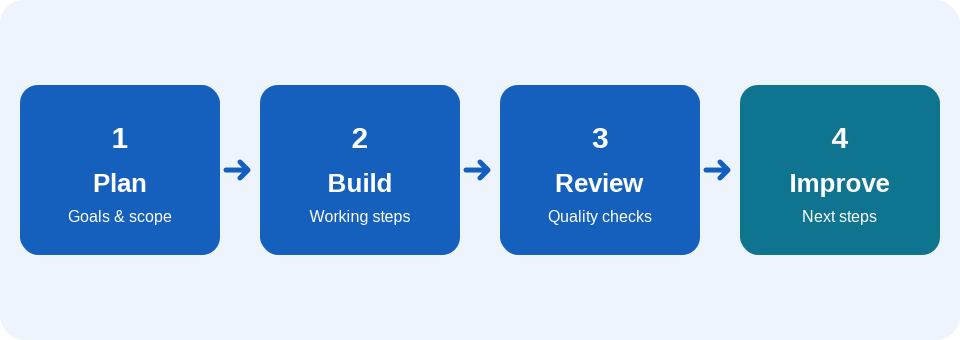
How A Learning Program Can Work
A reference program can move from a shared project brief through guided building, review, and a final demonstration. Agree learning outcomes, tools, support, timing, and acceptance criteria for each program.
- Plan
- Build
- Review
- Showcase
Plan → Build → Review → Showcase.
This is a reference sequence, not a promise of an available or scheduled course. A pilot may be scoped with an education partner before broader enrollment.
Privacy, Safety & Program Readiness
Before enrollment, define student eligibility, guardian or institutional consent where applicable, identity and access controls, permitted data, retention, support contacts, accessibility requirements, and incident handling. Establish whether the institution or SAHAYA is responsible for each activity and record the agreement.
Use synthetic or approved project data. Do not use production personal data, regulated records, secrets, or credentials in student projects unless the environment and controls have been expressly reviewed and approved for that purpose.
Illustrative Program Measures
The following are illustrative planning measures, not verified client results or guaranteed returns.
| Measure | Example target | How to review |
|---|---|---|
| Milestones completed | Track against the agreed plan | Project status history |
| Work reviewed | Review within the program's agreed cadence | Submission and feedback records |
| Projects demonstrated | Assess against stated criteria | Mentor or instructor rubric |
Illustration only. Set a baseline and targets with the education partner, then report actual results with their context and limitations.
Frequently Asked Questions
Can students log in and build software today?
The public Production student portal is not enabled. QA contains student/project implementations undergoing verification; that is not public enrollment or a hosted coding environment. Discuss program availability before relying on portal access or tools.
Is this an internship or a job guarantee?
No. Project-based learning and an actual internship are different offerings. Use the Careers page to ask about genuine opportunities; this page does not announce an open internship. Employment, placement, academic credit and provider certification are not guaranteed. A real internship requires its own host, supervisor, duties, eligibility, compensation classification, schedule and selection process.
What should I share when expressing interest?
Share your preferred path, current skill level, learning goal and availability through the inquiry form. A personal email is acceptable. For the required organization field, enter your school or Independent learner. Do not send transcripts, government IDs, health information, passwords or confidential work. An inquiry does not confirm enrollment, create a portal account, request payment or subscribe you to marketing.
How will we agree workload, fees and support?
Before enrollment, confirm prerequisites, curriculum, milestones, expected weekly effort, mentor capacity and review format, accessibility support, start/end dates, course and lab/exam costs, applicable taxes and cancellation/refund terms. Dates and mentor availability are not confirmed by this page. Begin with a manageable foundation and guided lab, then review and revise an original capstone before a portfolio demonstration.
Can a college manage its students and project payments?
Those are potential institution features, not available capabilities. Enrollment records, permissions, payment responsibilities, and any billing workflow require a separate agreement and implementation.
Can we start with a pilot?
A focused pilot may be discussed. Agree the participant group, learning outcomes, tools, schedule, support, data handling, and completion criteria before enrollment or payment.
Next Step
Education partners can discuss a scoped learning program through the solution inquiry page. See also student portal access, learning and education resources, and SAHAYA company information.